
Discovery Eco-Calculator
Implementation instructions
To install the calculator on the website page you have to add the script and the styles in the header area of the page.
<link rel="stylesheet" href="https://the-navigator-company-cdn.ams3.digitaloceanspaces.com/discovery-calculator/calculator.css" />
<script type="module" src="https://the-navigator-company-cdn.ams3.digitaloceanspaces.com/discovery-calculator/calculator.js"></script>
Then you have to add the following code in the place where the calculator should appear.
<div x-data="calculator" id="discovery_calculator"></div>Here is a complete example
<!DOCTYPE html>
<html lang="en">
    <head>
        <meta charset="utf-8">
        <meta name="viewport" content="width=device-width, initial-scale=1">
        <title>Discovery Paper eco-calculator</title>
		<link rel="stylesheet" href="https://the-navigator-company-cdn.ams3.digitaloceanspaces.com/discovery-calculator/calculator.css" />
		<script type="module" src="https://the-navigator-company-cdn.ams3.digitaloceanspaces.com/discovery-calculator/calculator.js"></script>
    </head>
    <body>
        <div x-data="calculator" id="discovery_calculator"></div>
    </body>
</html>
Localization
To localize the calculator you have to add a config with the language you need.
<div x-data="calculator({ lang: 'es' })" id="discovery_calculator"></div>The following languages are available: de, en, es, fr, fi, hr, it, nl, pl, pt
If it is necessary to customize any text on the calculator interface, simply override the corresponding key. The keys that are available for customization are:
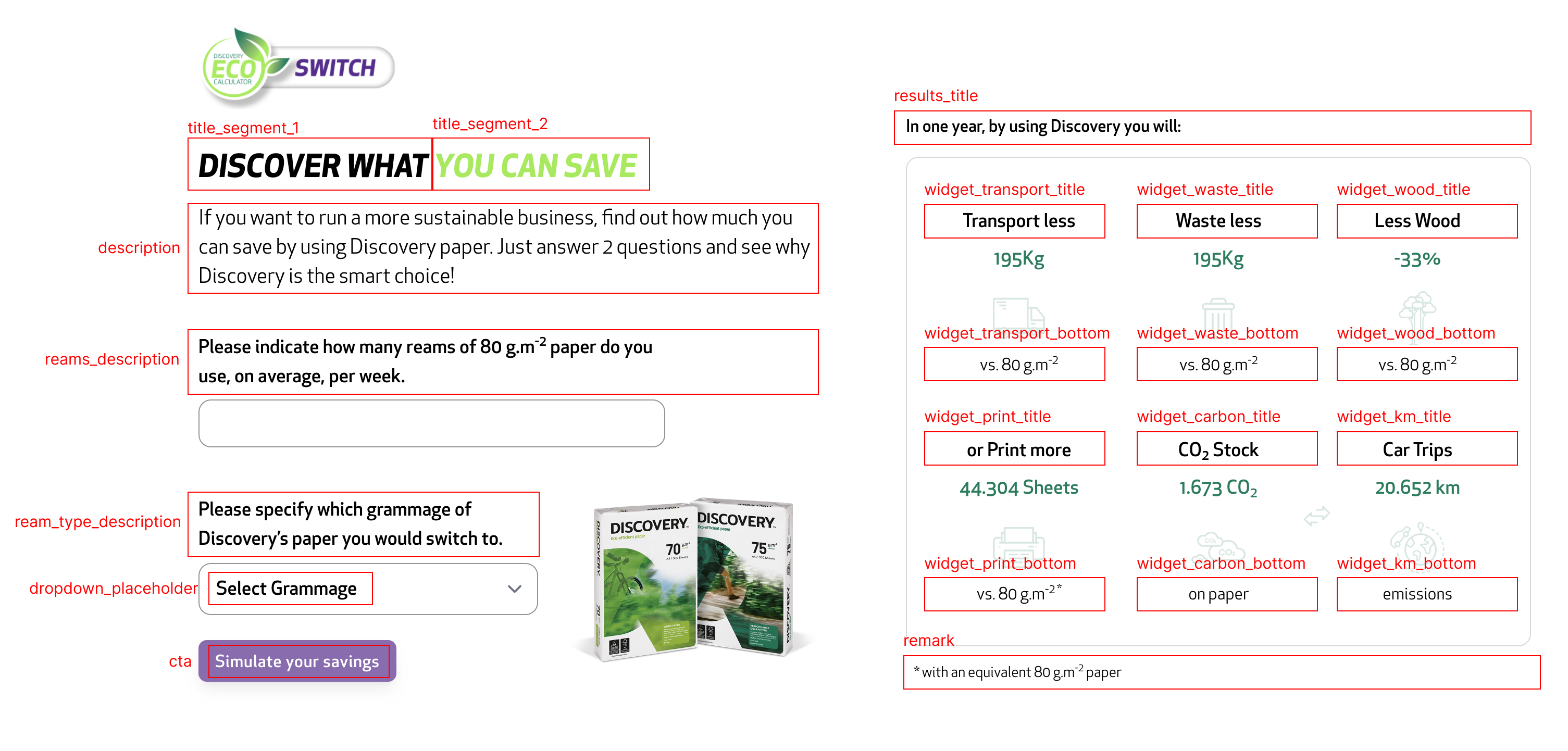
In this example, we will initialize the calculator in Spanish and change the button text to "GO!!!"
 <div x-data="calculator({
    lang: 'es',
    translations: {
        cta: 'GO!!',
    }
})" id="discovery_calculator"></div>
The result:

Demonstration in different screen sizes
The calculator is prepared to work on several screen widths. In this way we can guarantee a good user experience regardless of the device the user is using. Here are three examples of implementing the calculator in three different screen widths:
Example for a screen width of 1024px:
Example for a screen width of 768px:
Example for a screen width of 384px: